Decode any car listingwith a free Chrome extension
CarCheckerVIN - Decoder & Lookup is a free Chrome extension. When a page shows a car, it finds the VIN, decodes it with NHTSA's decoder, and opens a side panel with the car's damage and auction record counts, recalls and owner complaints. You don't need an account.
- Free
- No account
- Chrome 120 or later
- Version 0.6.1, November 16, 2026
What you get
The lookups you'd run in another tab, already open beside the listing
Checking a used car usually means a second tab: copy the VIN, paste it into a decoder, then go hunting for recalls. The extension runs those lookups when the page loads and puts the answers in Chrome's side panel, so the listing stays where it is.
Works where you already shop
It reads listings in full on 17 sites, from Cars.com, Autotrader and CarGurus to eBay Motors, Craigslist, Facebook Marketplace, Copart and IAA. Anywhere else it steps in only when it finds a VIN that passes its check digit.
Nothing to copy and paste
The VIN, year, make, model, price and mileage come off the page. The first time it sees a VIN, a small card names the car; one click opens the panel.
No account, nothing on our server
There is no sign-up. Your shortlist, watchlist and checklist stay in Chrome's storage on your computer, and the panel works the moment it's installed.
How it works
Four steps, and the first one only happens once
- 01
Add it to Chrome
Install it from the Chrome Web Store and pin the icon. Chrome asks for access to all sites; that is what lets it spot a VIN on any page, not only on the sites it knows.
- 02
Open a car listing
On a site it knows, it reads the whole listing. Anywhere else it waits for a VIN that passes the check digit, and drops the page if NHTSA's decoder can't name a make.
- 03
A card names the car
The first time it sees a VIN in a browser session, a card slides in at the bottom right with the car's name and its counts. It shrinks to a small chip after 25 seconds.
- 04
Read the side panel
See preview opens the panel: 6 checks, each with its source and the date it was read. Save the car to your shortlist or turn its results into an inspection checklist.
Inside the side panel
6 checks, each one labelled with where it came from
Below is the panel as it opens on a sample car (dummy VIN, sample figures, run through the extension's real check code). The record counts come from carcheckervin.com; the decode, recalls and complaints come from NHTSA and are fetched by your browser, not by our server.
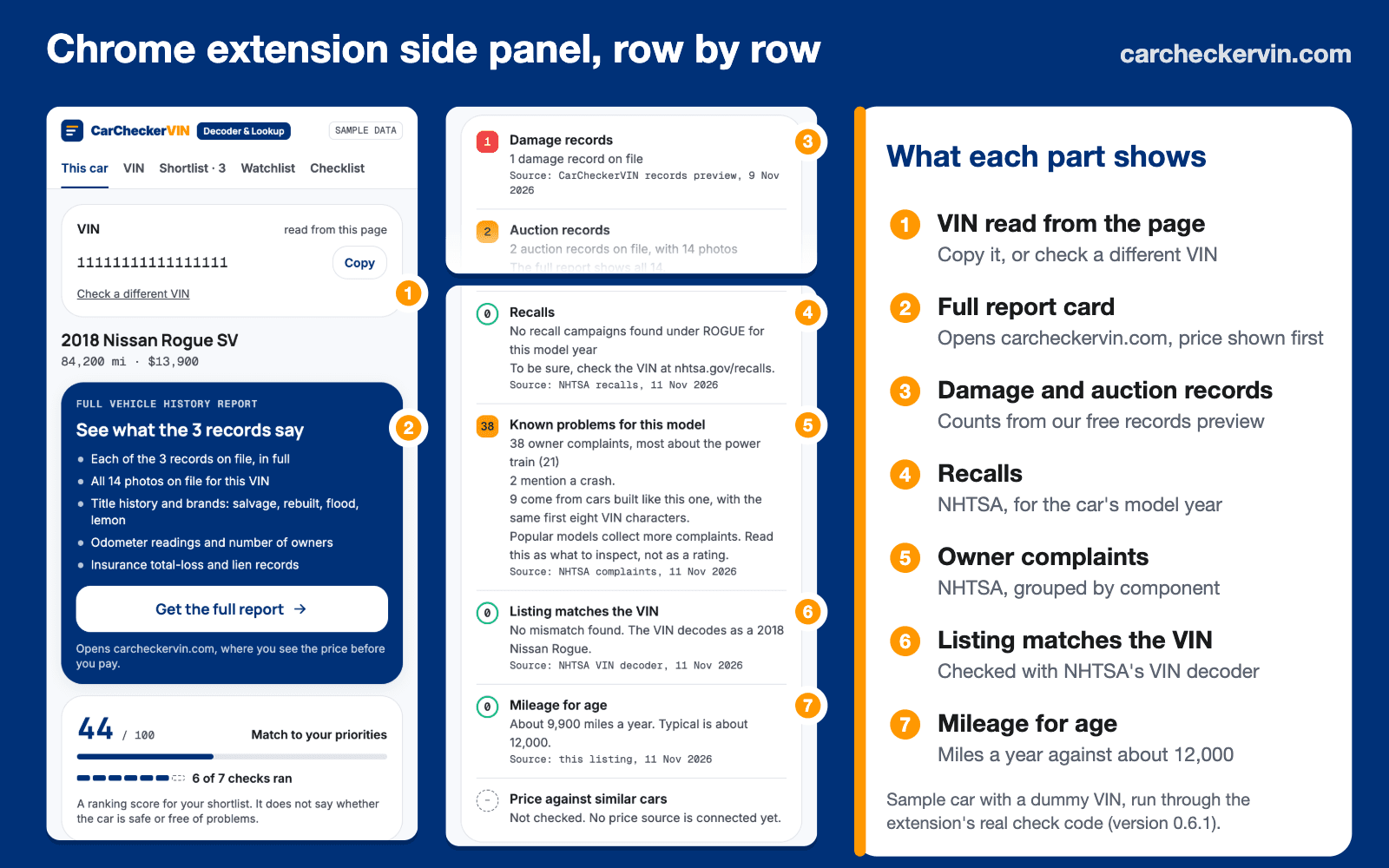
Damage records
How many damage records are on file for the VIN. The panel gives the count and the date it was read; what each record says is in the paid report, not here.
Source: carcheckervin.com records previewAuction records
How many times the car has been through an auction, and how many auction photos exist. When the preview has a photo, one is shown. If the listing never mentions an auction, ask the seller about it.
Source: carcheckervin.com records previewRecalls
Recall campaigns NHTSA lists for the car's model year. A zero is only reported under a model name NHTSA files rows for, and it always points you to nhtsa.gov/recalls, because recall files are sometimes named differently.
Source: NHTSA recallsKnown problems for this model
Owner complaints filed with NHTSA for that model and year, grouped by component, with how many mention a crash and how many come from cars built like this one (same first eight VIN characters). Popular models collect more complaints, so treat it as a list of things to inspect.
Source: NHTSA complaintsListing matches the VIN
What the VIN decodes to, set against the year and make the listing claims. For a VIN you type in yourself, the row becomes "The VIN adds up": the check digit, which catches a mistyped character, plus what the VIN decodes as.
Source: NHTSA VIN decoderMileage for age
Miles per year from the listing's odometer reading and the car's age, against a typical figure of about 12,000 a year. It flags very high mileage, and mileage so low you should ask to see service records.
Source: the listingThere is a seventh row, price against similar cars. It reads "Not checked" because no price source is connected yet, which is why the panel says 6 of 7 checks ran. We would rather show that than guess.
What it does differently
Five choices that shape what you see
None of these show up in a feature list, but they decide whether you can trust what the panel tells you.
It finds VINs on pages it has never seen
A dealer's own website, a forum post, a classified site we don't know: if the page shows a valid VIN, the extension offers its checks. To keep false alarms out, it is strict off the known sites. A French wine page that happens to say "vin" does not set it off.
- The VIN must pass its check digit, as every North American VIN does
- No more than two different VINs on the page
- Nothing is looked up unless NHTSA's decoder names a make
It says "Not checked" instead of guessing
Every row is a count, a zero, or "Not checked" with the reason. Nothing is ever called clean or safe, because a lookup can only say what a data source files, not what happened to the car.
- Never says clean, safe or no accidents
- A recall zero always points you to nhtsa.gov/recalls
- No price verdict until a price source is connected
It flags scam wording in private-seller ads
On Craigslist, Facebook Marketplace and listings whose structured data names a person as the seller, it reads the seller's own words and quotes any phrase a consumer agency warns about, with the source. Phrases the seller rules out, like "cash only, no Zelle", are skipped, and eBay is left out because its own buyer-protection text would trip it.
- Gift cards, wire transfers, payment apps or crypto (FTC)
- Can't meet, can't show the car, an away-from-home story (FTC)
- Escrow or shipping company holding the money (BBB study, Sept. 2020)
- Shipping offered, or a price under 70% of similar saved cars (FBI IC3, Jan. 2018)
- A deposit up front (eBay Motors); title not in the seller's name (New York DMV)
It explains salvage auction lots
On Copart and IAA lots it explains the lot's terms from the auction's own help pages and adds the auction's fees to any bid you type. Both auctions show signed-out visitors only the first 11 characters of the VIN; that is enough for 4 of the 6 checks, and you can paste the full VIN for the other two.
- Copart: Run and Drive, Engine Start, title, damage codes, keys, checked against the condition report's warning lights
- IAA: start code, title notes, airbags, and whether public buyers may bid
- Fees for any bid, plus what paying late or walking away costs
- Find your highest bid: the largest bid whose total with fees fits your number
It watches lots so you don't have to refresh
Watched lots get their sale time and current bid refreshed in the background, more often as the sale gets closer. Copart checks go out with your own Copart session; if Copart doesn't answer, the lot says the check failed.
- Every 6 hours, then every 2 hours the day before, every 30 minutes on sale day and every 10 minutes in the last 2 hours, capped at 40 checks an hour
- Alerts when a bid comes within 10% of your limit or passes it
- Reminders 24 hours and 1 hour before the sale, at the start and 3 hours after
- A note when a lot sells or its sale date moves, and an 8 a.m. summary on sale days
Who it's for
Three buyers it was built around
Buying from a private seller
You found a car on Craigslist or Facebook Marketplace and the seller wants to meet this weekend. The panel shows the record counts and recalls before you drive over, and the scam-signs card quotes anything in the ad that matches a known warning sign.
- Scam signs quoted from the seller's own words
- Record counts and NHTSA recalls before you go
- A checklist for before you go, at the car and on the test drive
Comparing cars across dealer sites
You have tabs open on three sites. Save each car to the shortlist and rank them by a score called Match to your priorities: you put records, mileage, price and year in your order, and it ranks the saved cars against each other. It doesn't judge whether any of them is a good buy, and says so.
- One shortlist across every site
- A VIN tab for a car you only have the VIN for
- Model-specific steps from NHTSA complaints, such as gear-change checks when power train complaints lead
Bidding at a salvage auction
You're watching lots on Copart or IAA. The panel turns the lot's codes into plain words, shows the fees on top of any bid, and keeps your bid limit. Reminders and limit alerts arrive as Chrome notifications, each with its own switch.
- Lot terms explained from the auction's help pages
- Real cost of a bid, using the same tables as our fee calculators
- Watchlist with automatic checks and reminders
By the numbers
Tested on live listings before release
Before release we ran the scam reader against 40 live owner listings on Craigslist in Austin, Texas, on November 13, 2026. It flagged 1 real warning sign, a seller offering a bill of sale only, and 1 false alarm: the word "deployment" in an ad about cable, which had matched the away-on-deployment pattern. We changed the pattern so that wording no longer fires. A sign isn't proof of fraud, and finding none isn't an all-clear.
The extension was also run end to end in a real Chromium browser, on our own test pages and on live Copart, IAA and Craigslist pages: VIN detection, the on-page card, the side panel, the watchlist, reminders, and automatic bid checks for both auctions with no auction tab open. Cars.com and eBay Motors turn away automated browsers, so those two weren't part of the automated run.
Privacy and permissions
What it reads, what it sends, and why it asks for each permission
Pages are read inside your browser to find a VIN. What gets sent is small: the VIN goes to carcheckervin.com for the record counts and to NHTSA's decoder; the year, make and model go to NHTSA's recall and complaint lookups; and for lots you watch, the lot number goes to Copart or IAA. Those are the only network calls in the extension's code. There is no analytics.
Everything you save lives in Chrome's storage on your computer. When you open the full report from the panel, the link tells carcheckervin.com it came from the extension.
The store listing declares "Web history" and "Website content" as the data it handles, and states that the data isn't sold or used for anything unrelated to the extension.
- All websites
- Its page script runs on every http and https page except carcheckervin.com, so it can spot a VIN anywhere. Only the VIN leaves the page.
- Side panel
- Shows the checks next to the listing instead of in a popup that closes when you click away.
- Storage
- Keeps your shortlist, watchlist, bid limits, checklist ticks and settings on your computer.
- Active tab and scripting
- Reads the current page again when you click the toolbar icon.
- Alarms and notifications
- Schedules watched-lot checks and sale reminders, and shows the alerts you switched on.
- Site access
- carcheckervin.com (record counts), api.nhtsa.gov and vpic.nhtsa.dot.gov (recalls, complaints, decode), copart.com and iaai.com (watched lots).
FAQ
Questions people ask before installing
Is the CarCheckerVIN Chrome extension free?+
Yes. Installing it and every check in it are free: the record counts, recalls, complaints, scam signs, the Copart and IAA tools and the watchlist. The only paid product it links to is the full vehicle history report on carcheckervin.com, at $14.99, and that page shows the price before you pay.
Do I need an account?+
No. There is nothing to sign up for. The extension works as soon as it is installed, and everything you save stays in Chrome's storage on your computer.
Why does Chrome say it can read data on all websites?+
Because its page script runs on every site, which is how it spots a VIN on pages it doesn't know, like a dealer's own site. On those pages it ignores everything except a valid VIN or schema.org vehicle data, and only the VIN leaves the page. You can narrow this in Chrome under the extension's Details, Site access; it will then only detect cars on the sites you allow.
Does it tell me if the price is fair?+
No. The panel has a price row, but it reads Not checked because no price source is connected yet. On an auction lot, the cost card shows the fees on top of a bid, which is a different question from what the car is worth.
Will it bid for me on Copart or IAA?+
No. It reads lot pages, works out fees, keeps your watchlist and reminds you before the sale. You place every bid yourself on the auction's own site. The automatic checks run on a schedule, so during the live sale the panel is not a live feed.
Copart hides part of the VIN. What happens then?+
Copart and IAA show visitors who aren't signed in only the first 11 characters. The extension uses those to decode the car and look up its recalls and complaints, so 4 of the 6 checks run. The damage and auction record checks need the full VIN; paste it into the panel's VIN box if you have it.
Does it work for cars outside the US?+
It is built for US vehicles. NHTSA's recall and complaint data covers the US market, and the records lookup answers for US and Canadian VINs. For any other VIN the record rows say the car is outside coverage.
Which browsers does it run in?+
It is built for Google Chrome, version 120 or later, and installs from the Chrome Web Store. On a phone, the CarCheckerVIN iPhone app does a similar job by scanning the VIN barcode.
Add CarCheckerVIN to Chrome
It's free and needs no account. Open any car listing after you install it, and the side panel fills in.
Free on the Chrome Web Store · Version 0.6.1
Where these facts come from
- CarCheckerVIN - Decoder & LookupChrome Web Store: version, size and data disclosure
- vPIC VIN decoder APINHTSA
- Check for recallsNHTSA
- NHTSA datasets and APIsNHTSA: recalls and owner complaints data
- Put the brakes on phony online car salesFederal Trade Commission
- How To Avoid a ScamFederal Trade Commission
- Fraudulent Online Vehicle SalesFBI Internet Crime Complaint Center, January 17, 2018
How we made this page: written by the CarCheckerVIN editorial team with AI assistance, from the extension's own source code (version 0.6.1) and its Chrome Web Store listing. Facts checked November 18, 2026.
Records in our reports reflect what was reported to our data providers. Our reports do not include police or repair-shop accident entries. Recall and complaint data comes from NHTSA. CarCheckerVIN is not affiliated with Google, Copart or IAA. Chrome is a trademark of Google LLC.